
Mission Control
See where the business stands. Know where to look next.
Mission Control brings the current financial position, runway, burn, revenue context, and deterministic signals into one operating review. See what deserves attention, then open the product area that owns the underlying number.
- Role
- Financial synthesis layer
- Signals
- Deterministic and traceable
- Decision
- Reviewed by a person
Cash context, runway, burn, and source freshness
Product evidence
One review surface, with the source context still attached.
The current application brings the headline position and several supporting sections into one view. The capture below demonstrates that connected review structure; it is not a promise that every organization has every section populated at once.
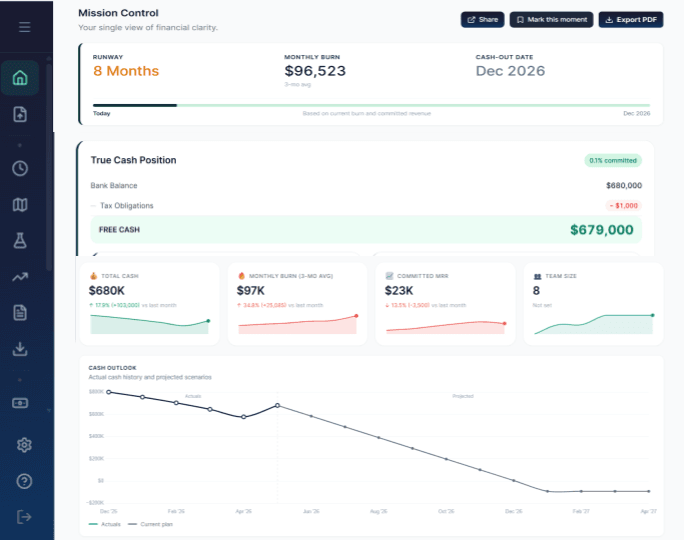
Mission Control: operating review
Capture the current product with the financial position, source freshness, prioritized deterministic signals, and at least one visible route into an owning workflow. Use reviewed fictional data only.
public/product/mission-control-operating-review.pngCurrent operating position
Start with a position that can be read without blurring the terms.
Mission Control is a read model. It receives values from the modules that own them and presents a point-in-time operating view. It does not become a second ledger, rewrite source data, or turn a planning estimate into recorded fact.
The headline numbers answer different questions. Keeping those definitions visible makes the review faster without making the decision for the reader.
- True Cash Position
- A product-derived view that keeps held cash and recorded obligation context together. It is not the same as bank balance, unused credit, expected revenue, or runway.
- Runway
- A deterministic readout from the current financial path. It provides planning context, not a prediction or guarantee about what happens next.
- Monthly burn
- A reconciled operating-cost readout. It helps explain pressure around the position without replacing the month-by-month runway path.
- Source freshness
- The operating view carries the time at which its snapshot was computed so the reader can judge how current the review is.
Source ownership
Mission Control connects the picture. The source products own the details.
The command center is useful because it reduces the distance between a financial signal and the workflow behind it. It summarizes across supported modules, then lets the operator investigate the source instead of editing a disconnected dashboard number.
Pressure and attention
Show the condition. Keep the next step traceable.
Alerts and actionable insights are generated from deterministic rules over supported financial data. Severity and priority help order the review, while the underlying metric and destination keep the signal accountable.
These are not AI predictions, autonomous recommendations, or automatic decisions. A person still interprets the condition, opens the relevant workflow, and decides what should change.
- 01Recorded conditionA supported value or change enters the snapshot.
- 02Deterministic ruleA threshold or comparison evaluates the condition.
- 03Prioritized signalSeverity helps place the item in the review.
- 04Human reviewThe operator opens the source and chooses the response.
Financial-state integrity
Keep reality, expectation, plan, and possibility distinct.
A useful command center can place different forms of context near each other without making them interchangeable. Labels and source ownership preserve the boundary.
- 01
Recorded and confirmed
Held cash, realized receipts, active team costs, and other recorded inputs form the current operating reality.
- 02
Expected and committed
Pipeline, expected receipts, and known commitments can add context without being presented as cash already received.
- 03
Planned
An approved budget or operating plan stays available for comparison with actual results without rewriting them.
- 04
Hypothetical
Saved Scenarios remain explicit alternatives. They do not become the current position or canonical runway.
Expected revenue does not become received cash. A plan does not become an actual. A Scenario does not overwrite the current runway.
Operating rhythm
Review the whole. Investigate the source.
Mission Control supports a repeatable financial review. It is the place to orient, notice pressure, and decide where deeper work is needed. The detailed product areas remain the place to understand and update the inputs.
- 01
Read
Start with the current position and its timestamp.
- 02
Notice
See the change, pressure, or threshold that needs attention.
- 03
Trace
Open the product area that owns the underlying input.
- 04
Review
Make the decision, update the source, and return to the whole picture.
Mission Control
Start with the position. Follow what needs attention.
Bring the supported financial picture into one operating review, then keep every deeper decision connected to its source.
Start free