Planner

Build the financial plan from the assumptions that drive it.

Create persisted revenue models and budgets, inspect the calculated outlook, and compare the plan with recorded results. Keep hypothetical alternatives in Scenarios so the current plan stays clear.

Inputs
Assumptions and line items
Saved state
Models and budgets
Output
Calculated outlook and variance
Current product evidencePlanner / Revenue modeling
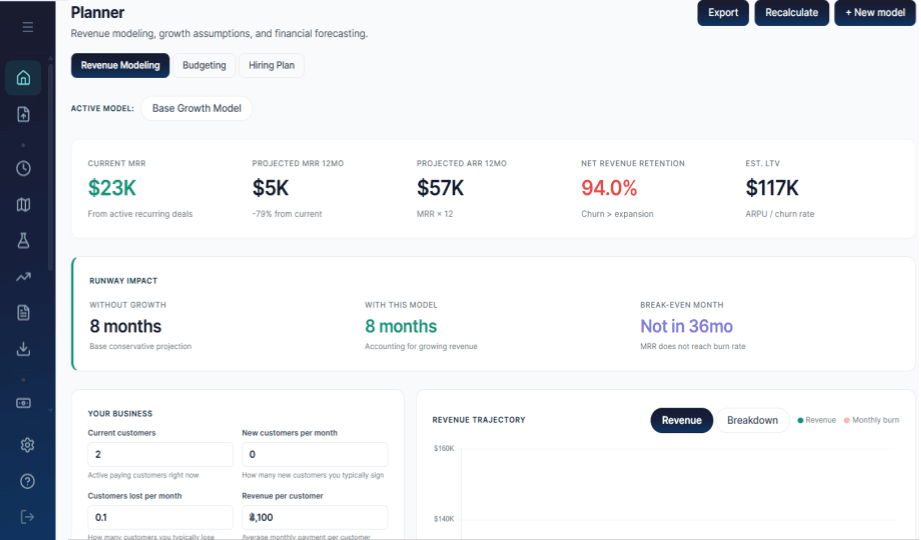
RunwayCal Planner showing an active revenue model, revenue metrics, runway impact, assumptions, and revenue trajectory
A saved revenue model exposes its assumptions, calculated outlook, and runway-impact context in the Planner surface.

What Planner contains

Planner holds the operating plan and its mechanics. Related products use those outputs, but they do not become part of Planner simply because the numbers connect.

  1. 01

    Revenue models

    Save a recurring or throughput model, set explicit assumptions, and inspect the server-calculated monthly outlook.

    Persisted model
  2. 02

    Budgets

    Set period-based line items for payroll, tools, commitments, revenue, or a custom planning line.

    Persisted plan
  3. 03

    Observed comparison

    Compare the plan with recorded results from the operating modules that supply actual values.

    Comparative context
  4. 04

    Hiring connection

    Planned roles live in Team. Their start dates and entered compensation feed a separate Hiring Impact view.

    Connected input
  5. 05

    Consolidation readout

    Bring a selected revenue model and planned-hire references into a combined plan readout while preserving the basis of each input.

    Calculated readout

A plan keeps its inputs and its output visible.

Revenue and budget planning begin with explicit inputs. RunwayCal persists the plan, calculates its outlook, and leaves the assumptions available for review.

  1. 01Input / assumptionGrowth, churn, period, category, amount, or timing
  2. 02Persisted planA saved revenue model or budget remains editable
  3. 03Calculated outlookProjection, comparison, variance, and impact context
Conceptual mechanics map. This is not a product screenshot.
Revenue modeling

Choose the engine. Set the assumptions. Inspect the projection.

A recurring model can use current MRR, growth, churn, expansion, contraction, retention, and seasonality. A throughput model uses units, rate, utilization, and applicable operating drivers.

One active model supplies the calculated revenue outlook. Forecast vs actual compares that model with actual MRR from recorded monthly snapshots; it does not recast the model as realized revenue.
Budgets and variance

Set the plan by period. Compare it with the matching record.

Budget lines persist by period and category. Actual values are read from the relevant operating modules, then compared across the same window.

Variance is review context, not a rewrite of cash or accounting history. A custom planning line without an actual source remains plan-only instead of inventing a zero result.

The label tells you what kind of number you are looking at.

A useful plan does not blur what happened, what was intended, what was calculated, and what is only being tested.

Realized / observed

Money or operating activity that has been recorded as having happened.

Planned

Persisted operating intent, including saved models, budgets, and planned hires.

Modeled

A calculated outlook produced from explicit assumptions. It is not a realized result.

Scenario

A hypothetical alternative kept separate from the current plan and canonical reality.

State doctrine used on this page. Meaning is carried by labels and text, not color alone.

Current operating plan

Planner persists intent.

Edit the assumptions or budget lines when the operating plan itself changes.

Hypothetical alternative

Scenarios test a departure.

Scenario adjustments and results remain separate from the current plan and recorded financial reality.

Explore Scenarios

Hiring starts in Team, then becomes financial impact.

A planned hire records a role, department, start date, and entered compensation. Hiring Impact can compare current and adjusted burn, runway, and a twelve-month cash trajectory while respecting the planned start month.

RunwayCal does not infer taxes, benefits, or overhead that were not entered. Filling a role changes its operating status; it does not turn a hypothetical Scenario into the canonical plan.

See the Hiring Planning decision context
Current product evidenceTeam / hiring source
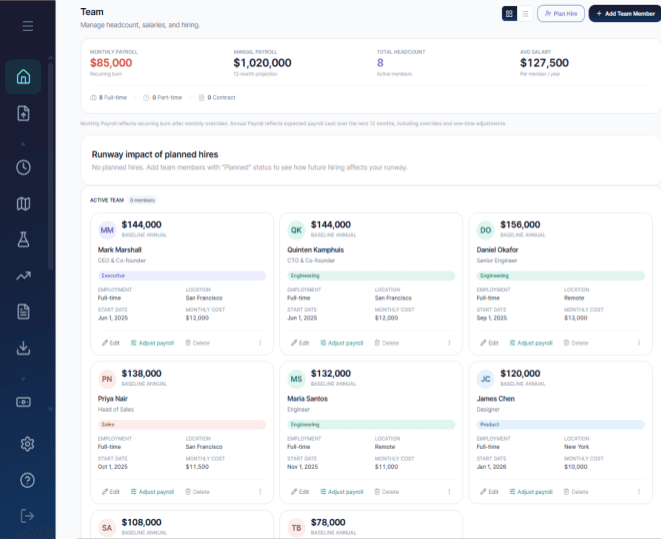
RunwayCal Team surface showing payroll metrics, the planned-hire impact area, and team records
Planned hires are maintained in Team. This evidence shows the source surface and its Hiring Impact entry point, not a Planner tab.

Put the assumptions inside the plan.

Build a plan that keeps its inputs, calculated outlook, and observed comparison available for review.

Start free