
Investor reporting and board updates
Turn the financial picture into a report people can understand.
Bring the cash, runway, plan, variance and operating context you already review into a clear board or investor update. Keep the explanation beside the numbers and control what gets shared.
- On-demand output
- Context beside the numbers
- Read-only access
- Founder-controlled sharing
Conceptual boundary, not product UI. Creating an output does not send it automatically.
Chapter 01
Start from the numbers the business is already using.
Investor reporting should begin with the same cash, runway, burn, revenue, plan, and variance the team has reviewed inside RunwayCal. The update should not begin by rebuilding those figures in a separate slide file.
Mission Control provides the starting view. Leadership still decides what the movement means and what belongs in the update.
Chapter 02
Add the explanation the numbers cannot carry alone.
A movement in runway or burn needs more than a label. Add why it moved, which assumption changed, what management decided, and what is still uncertain. RunwayCal does not write that judgment for you.
Chapter 03
Build the board update when the story is ready.
RunwayCal generates the standard Board Deck as a 12-slide PPTX on demand. Choose from five visual templates, review the file, then decide how it should be shared.
Consolidated multi-location decks follow a separate structure and vary with the number of locations. Neither format is sent automatically.
Conceptual outline, not product UI. The supported Board Deck is generated as a standard 12-slide PPTX and reviewed before sharing.
Chapter 04
Turn the reviewed numbers into a shareable update.
Choose the figures, add the explanation, generate the supported output, and review it before anyone else receives it. The RunwayCal view remains the source behind the shared file or link.
Chapter 05
Share a read-only view without opening the operating system.
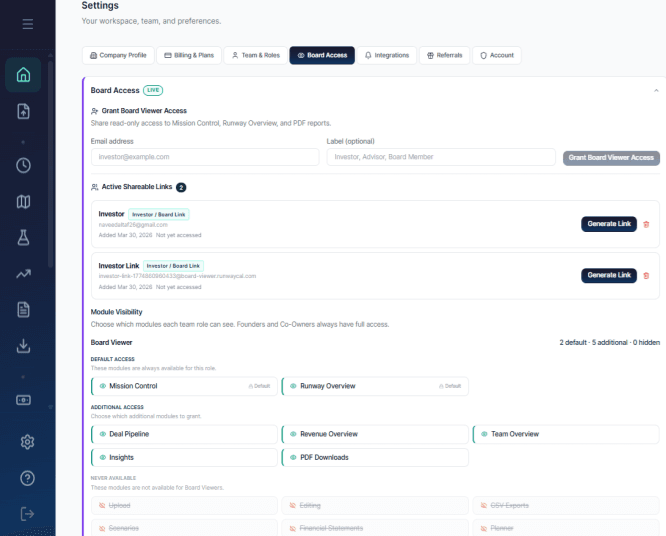
Board Access uses a token-based link rather than a conventional product account. A founder or co-founder chooses the supported modules a recipient can see and can revoke the link. The default expiry is 30 days.
The recipient gets a read-only view and supported downloads, not editing access. Creating a link or sending an investor email remains an explicit user action.
Chapter 06
Make the access boundary visible.
Board viewers can see supported read-only modules and retained downloads that a founder makes available. They cannot edit, open Scenarios or Planner, reach input modules, change settings, create archives, or export raw CSV data.
Chapter 07
Keep the report that was actually shared.
Founder Archives preserve the original Mission Control PDF at the moment the archive is created. Opening it later returns the stored file rather than rebuilding it from today's figures.
Scheduled monthly archives and founder digests are separate features. They do not automatically send an investor update.
Chapter 08
Verify the numbers before publishing.
Check the reporting period and labels. Make sure the figures match the product state you selected, and explain the material movement the numbers cannot explain on their own.
Then confirm the output contains only what the intended recipients should receive. A generated report is still private until someone explicitly exports or shares it.
Chapter 09
Send the update when the context is ready.
Review the numbers, add the explanation and share the supported report without rebuilding the financial story from scratch.