
Retail & Stores
Stores · Inventory · Suppliers
Sales move fast. Inventory, payroll, and store commitments follow close behind.
Connect sales, inventory, staffing, and cash across stores. See what is moving before the next supplier order or commitment becomes fixed.
Retail financial reality
Strong sales do not settle every store commitment.
Sales can rise while inventory, suppliers, rent, payroll, and other commitments keep moving. Follow settlement into cash before deciding what is available to commit again.
The retail cash loop
The sale is one moment inside a longer cash cycle.
buy → sell → settle → decide
- 01
Inventory commitment
Cash is spoken for before the stock sells
- 02
Sell-through
Sales show how quickly stock is moving
- 03
Settlement
Recorded sales still carry payment timing
- 04
Reorder
The next buy competes for available cash
- 05
Cash
The decision uses the settled financial position
A strong sales week does not automatically mean more cash is available to commit.
Always moving
- Payroll
- Rent
- Local spend
- Recurring commitments
These costs keep their own timing even when sales move quickly.
Store by store
Keep each store visible in the group plan.
A group total can hide which location changed. Keep each store's movement and fixed commitments visible before reviewing the business together.
- Store A
MovedSales ahead of plan
FixedInventory order due
Reorder now or preserve cash?
- Store B
MovedSales below plan
FixedPayroll unchanged
Change staffing or wait?
- Store C
MovedSales near plan
FixedRent and local spend due
Hold discretionary spend?
Together
Keep each store visible inside the group cash decision.
Inventory, suppliers & staffing
See the cash pressure already forming behind the shop floor.
Inventory, supplier terms, rent, Store Staff, and POS & Systems can become fixed before sales arrive. Keep them beside the revenue plan.
- 01
Inventory
Stock already ordered or planned
How much cash is already committed before the stock sells?
- 02
Suppliers
Known supplier terms and timing
Which payments become due before the next sales cycle?
- 03
Store Staff
Staff Member and seasonal staffing cost
Is staffing moving ahead of the sales plan?
- 04
Rent · POS & Systems
Fixed store and operating systems cost
Which store costs remain fixed when traffic changes?
- 05
Cash Commitments
Other scheduled obligations
What remains available after known commitments?
Plan & decide
Find the drift before changing the store plan.
Compare plan with the recorded result. Keep variance visible, then review staffing, inventory spend, purchase timing, or sales assumptions.
Plan vs actual
Turn store variance into a decision.
Review sales, inventory spend, and staffing before deciding.
- Plan
Approved assumptions
- Actual
Recorded period
- Variance
Difference retained
- Next action
Review and decide
Sales
- Plan
- Approved sales assumptions
- Actual
- Recorded period result
- Variance
- Difference retained
- Next action
- Review the Revenue Stream or Category assumptions
- Status
- Review movement
Inventory spend
- Plan
- Approved inventory budget
- Actual
- Recorded period spend
- Variance
- Difference retained
- Next action
- Review spend or purchase timing
- Status
- Review commitment
Store staffing
- Plan
- Approved Staffing Plan
- Actual
- Recorded staff cost
- Variance
- Difference retained
- Next action
- Review staffing against store demand
- Status
- Review capacity
Scenarios
Test the next store decision before making the commitment.
Test staffing, a planned order, discretionary spend, or a location cost while keeping the current store plan visible.
Illustrative decisions
- 01
Lower store traffic
What changes when fewer visits enter the revenue plan?
- 02
Change conversion
How does a different conversion assumption affect revenue?
- 03
Increase inventory spend
What happens when more cash is committed to stock?
- 04
Open another store
How do added fixed costs change the current plan?
Decision examples only. They are not Retail-specific scenario presets.
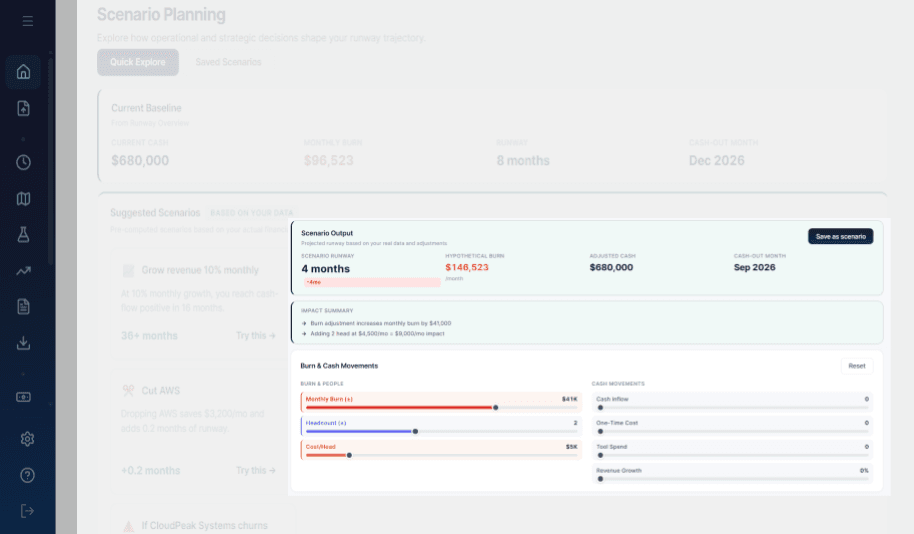
Inside RunwayCal · Scenarios
The visible product supports changing assumptions and comparing runway, burn, cash, and cash-out timing against a baseline.
Product proof
Keep the store plan connected to the complete financial position.
Mission Control holds the primary financial view. Board Access keeps a selected read-only view available without making a Retail-specific claim.
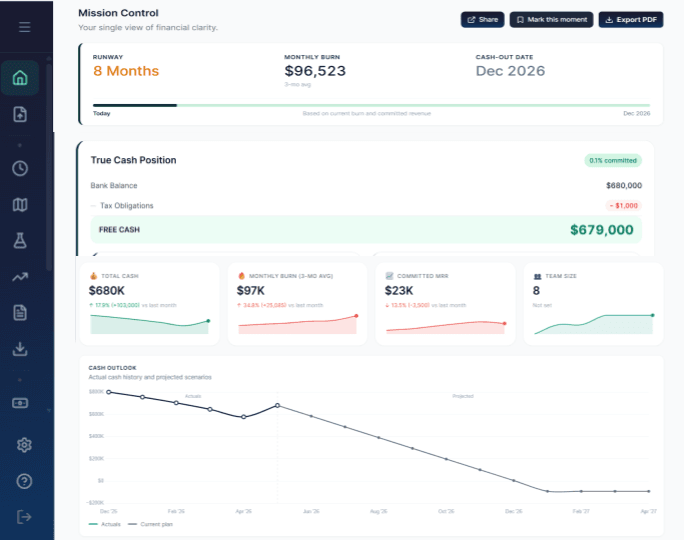
Primary product view · Mission Control
Start with the complete financial position.
The visible product brings runway, monthly burn, cash-out date, True Cash Position, and financial summary context together. It is general product evidence, not a store dashboard.
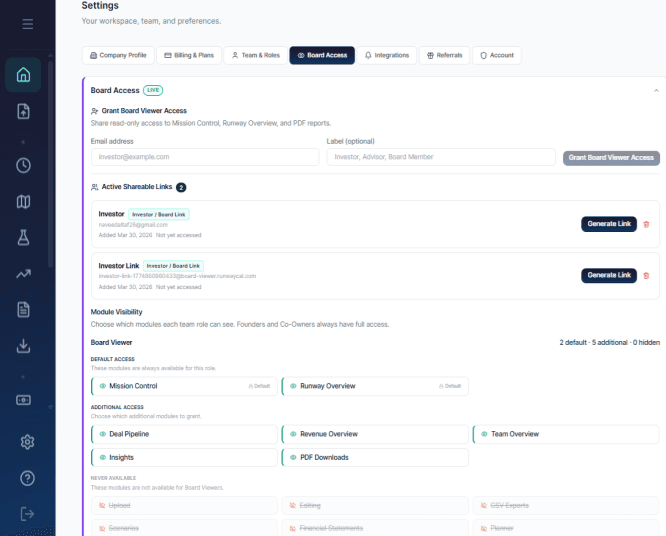
Supporting reporting evidence · Board Access
Share a selected read-only view.
The visible settings surface supports read-only viewer access, active links, and module visibility controls. It does not claim location-specific investor reporting.
Reporting & metrics
Use each number to ask a better store question.
Give owners, finance leads, and multi-store managers the operating context behind sales, Store Staff, commitments, and cash.
Explore reporting- Sales Collection Rate
- Decision question: How much recorded sales value has been collected?
- Product-evidenced concept
- Revenue per Employee
- Decision question: Is revenue keeping pace with the current Store Staff base?
- Visible in product
- Store revenue
- Decision question: Which store or Category is contributing to the current plan?
- Website language
- Average basket
- Decision question: What happens to modeled revenue when basket size changes?
- Planning concept
- Conversion rate
- Decision question: How sensitive is the revenue plan to conversion?
- Planning concept
- True Cash Runway
- Decision question: How long can the business operate after known commitments?
- Website language
Some measures are visible in the product today. Others are website-supported or conceptual planning lenses, not automatic calculations.
Keep planning
Take the store question into the right planning view.
Move from sales, settlement, and commitments into the next financial decision.
Plan the next store decision without losing sight of cash.
Connect sales, inventory, suppliers, staffing, and commitments before the next move becomes fixed.