
SaaS & Software
Subscriptions · MRR · Customers
Recurring revenue is not the same as cash in the bank.
Connect contracts, recurring revenue, billing and collection timing, payroll, tools, and scenarios without treating revenue as cash already received.
SaaS revenue movement
Recurring revenue changes before cash does.
New and expanded subscriptions can lift MRR. Contraction and churn pull it back. The ending position still has to move through collection before it becomes cash.
Starting position
Base MRR
Recurring revenue at the start of the period
- +01
New MRR
New recurring revenue
- +02
Expansion
Growth from existing customers
- −03
Contraction
Reduced recurring revenue
- −04
Churned MRR
Recurring revenue removed
- ↻05
Renewal
A recurring contract reaches its renewal point
Period change
Net movement
Recurring revenue position
Ending MRR
Revenue plan changes
The operating plan can move when customer movement changes.
Cash timing may change
The contract and revenue plan still have to move through billing and collection.
Money & timing
Revenue movement is not cash movement.
A contract, a revenue plan, billing, collection, and recorded cash are different states. Payroll, cloud tools, contractors, and recurring spend keep moving between them.
- 01
Contract
Commercial agreement
Not cash received
- 02
Revenue plan
Timing assumption
Not a revenue-recognition engine
- 03
Billing
Collection opens
Cash timing remains open
- 04
Collection
Payment is received
Received and expected remain separate
- 05
Cash
Recorded cash position
Can inform the next decision
Commitments keep moving
- Payroll
- Cloud / tools
- Contractors
- Recurring spend
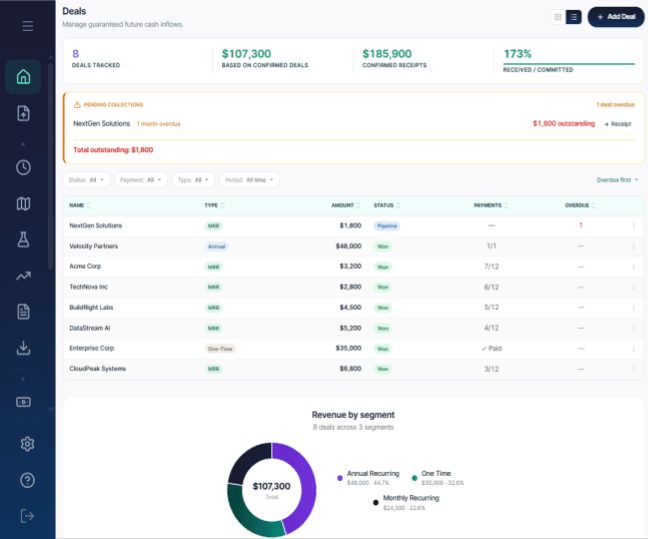
Inside RunwayCal · Deals
Collection context stays visible.
The visible Deals surface separates committed deals, confirmed receipts, pending collections, and per-deal payment status.
Future commitments
Know what's already committed before you spend again.
Payroll, renewals, tax obligations, and vendor payments can remain due while collection timing is still open.
- 01
Payroll
Recurring team cost
What is already committed before the next collection?
- 02
Software & Tools
Renewals and operating systems
Which renewals still support the way the company operates?
- 03
Tax obligations
Known filing and payment windows
What remains reserved before free cash is assessed?
- 04
Vendor commitments
Contracted or scheduled outflows
What leaves cash even if a customer payment arrives late?
Plan & decide
See the difference. Test the next move.
Compare the plan with what actually happened, then test your next decision before it becomes another commitment.
Plan vs actual
Turn the variance into a review.
Keep recurring revenue, payroll, and software differences visible before adjusting the plan.
- 01
Plan
- 02
Actual
- 03
Variance
- 04
Driver
- 05
Scenario
- Plan
Approved assumptions
- Actual
Recorded period
- Variance
Difference retained
- Next action
Review and decide
Subscription revenue
- Plan
- Approved revenue plan
- Actual
- Recorded period result
- Variance
- Difference retained
- Next action
- Update the assumption or investigate the result
- Status
- Review movement
Payroll
- Plan
- Approved team budget
- Actual
- Recorded team cost
- Variance
- Difference retained
- Next action
- Revisit the team plan
- Status
- Review commitment
Software
- Plan
- Renewal budget
- Actual
- Recorded tool spend
- Variance
- Difference retained
- Next action
- Keep, change, or remove the commitment
- Status
- Review renewal
Scenarios
Test the decision before you commit to it.
Change one operating assumption, keep the baseline visible, and review how runway, burn, cash, and cash-out timing respond.
Illustrative decisions
- 01
Change hiring
What happens to burn and runway when payroll moves?
- 02
Model customer loss
How does lower recurring revenue change cash timing?
- 03
Add funding
How does new capital change the current baseline?
- 04
Reduce tool spend
Which commitment changes the projected cash position?
Decision examples only. They are not preset SaaS scenarios or automatic recommendations.
Inside RunwayCal · Scenarios
The visible product compares an adjusted scenario with a baseline and shows runway, monthly burn, cash, cash-out timing, and impact context.
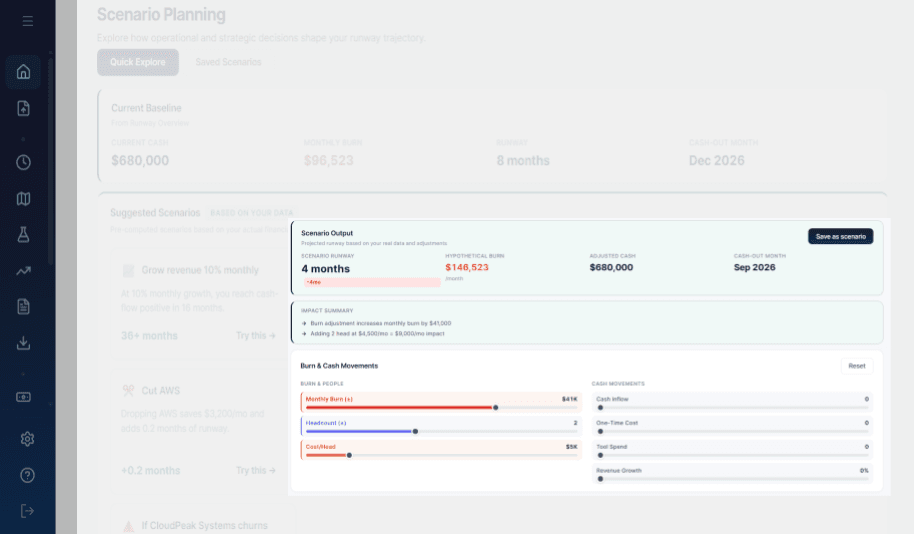
See the whole picture. Then see what's driving it.
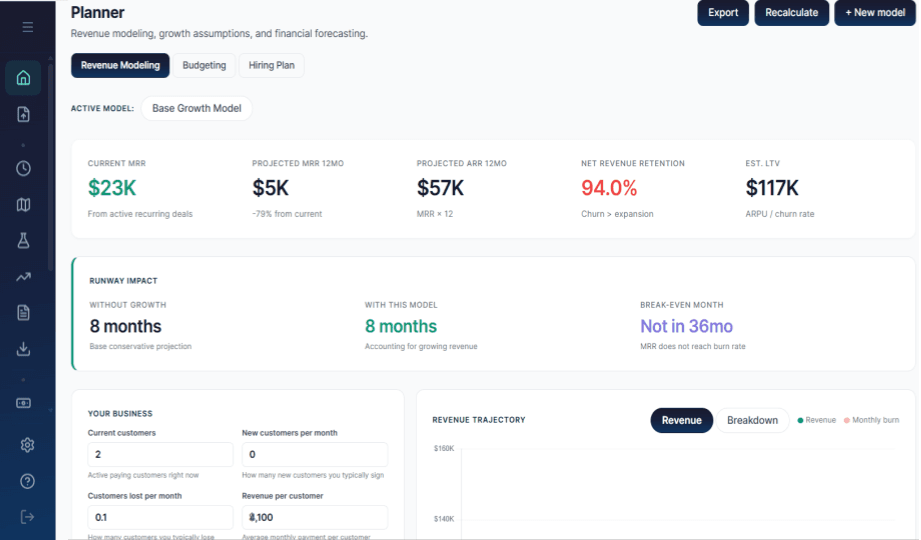
Mission Control is the primary product view. Planner keeps the revenue, budget, hiring, and runway-impact assumptions beneath it visible.
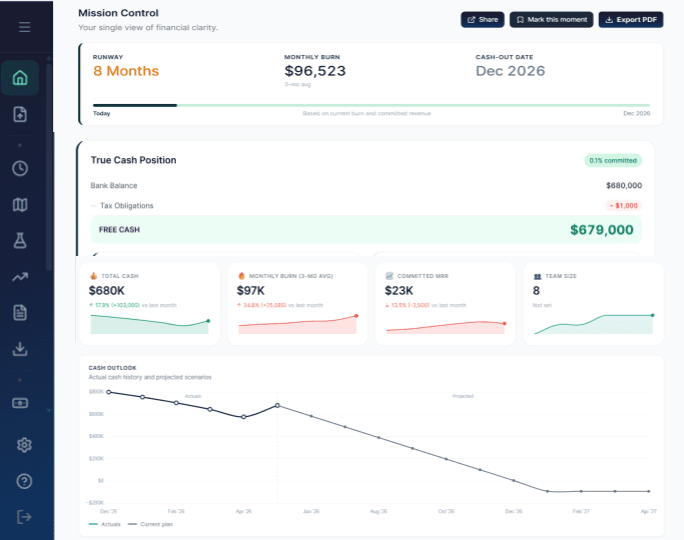
Primary product view · Mission Control
Start with the complete financial position.
Runway, monthly burn, cash-out date, True Cash Position, and Cash Outlook are visible together.
Supporting revenue-model evidence · Planner
Keep the operating assumptions visible.
Revenue Modeling, Budgeting, Hiring Plan, current and projected revenue, and runway-impact context are visible in the product.
Reporting
Share the numbers without losing the story behind them.
Give investors, board members, or leadership a selected view with the operating context still attached.
Explore investor reports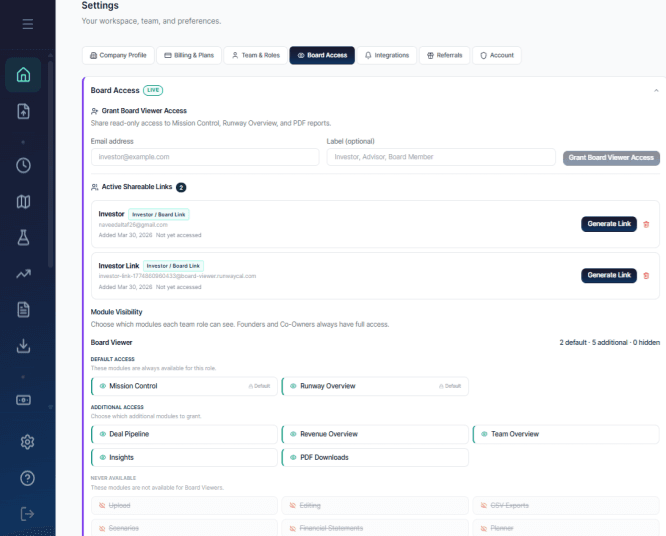
SaaS metrics
Know which numbers actually matter.
Use recurring revenue, burn, team, commitments, and runway measures to ask what changed and what needs review.
- MRR Movement
- Decision question: Where is recurring revenue growing? Where are you losing it?
- Planning concept
- Burn Multiple
- Decision question: How much cash are you burning to create new recurring revenue?
- Planning concept
- Revenue per Employee
- Decision question: Is revenue keeping pace with team growth?
- Planning concept
- Deferred Revenue
- Decision question: How much cash have you collected for revenue you still need to earn?
- Planning concept
- Runway Compression
- Decision question: Is your runway getting shorter month after month?
- Planning concept
- True Cash Runway
- Decision question: How long can the business operate after known commitments are accounted for?
- Planning concept
Keep planning
Take the recurring-revenue question into the plan.
Move from customer movement, commitments, and cash timing into the planning view that answers the next question.
Plan recurring growth without losing sight of cash.
Connect contracts, revenue movement, payroll, tools, billing, and collection timing before the next commitment.