
Planning need · Scenario planning
Test the decision before it becomes reality.
Change a hiring, revenue, cost, funding or timing assumption and see what it could do to cash and runway before you commit. The scenario stays separate from the financial position you are actually operating from.
01 · Current reality
Start from the financial position you already have.
A useful scenario needs an anchor. RunwayCal's Baseline is a scenario construct aligned with the current confirmed position in Runway Overview. It is the comparison point, not a license to treat every future assumption as recorded fact.
02 · Assumption
Change the assumption, not the actuals.
Ask a concrete question. What happens if we hire now? What if revenue grows more slowly? What if funding or collections arrive later? Each change belongs inside the scenario until the business confirms something different.
Hiring
Add a role, change its start month, or remove a planned hire.
Revenue
Change a deal or revenue assumption without recording a receipt.
Spend
Test tools, commitments, payroll, or a one-time expense.
Funding
Move a possible cash inflow or change when it may arrive.
Timing
Shift when an inflow or outflow enters the cash path.
03 · Consequence
See the consequence move through the plan.
The changed assumption is only the input. The decision becomes clearer when you can see how it changes cash, monthly burn, runway, and the timing of a possible cash-out point.
04 · Product proof
Build the possible path in Scenarios.
Begin with Baseline or use Conservative, Growth, and Expansion as editable starting points. Save the scenario, reopen it against the current baseline, and compare the supported consequences without changing confirmed records.
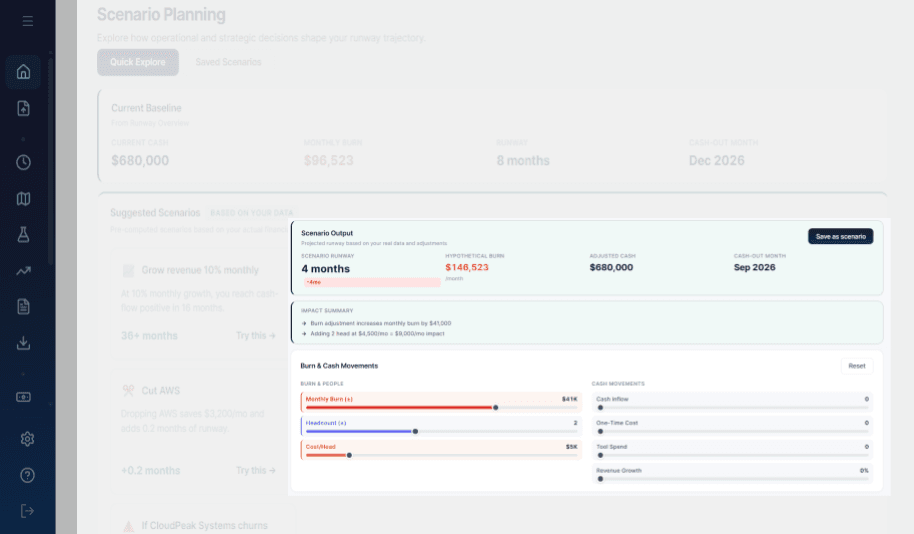
Presets are seeded from organization data and expose their assumptions. They are not predictions or recommendations.
Current comparison can place Baseline beside selected saved scenarios. CSV export preserves the baseline, scenario, delta, and whether the path is hypothetical.
05 · Compare
A scenario is useful when you can compare it.
The question is not whether a path looks optimistic or cautious. It is how each explicit assumption changes the financial path relative to the same anchor.
06 · Trust boundary
Save the question, not a new reality.
It can be reopened and recomputed against the current baseline.
It changes only when the underlying real-world state changes.
07 · Decide
Compare the paths. Then decide what becomes real.
Bring the scenario back to the operating question. Review the current runway, the numbers behind it, and the planning assumptions before committing. RunwayCal shows the consequence; the business chooses the action.
Before the commitment
See the consequence before you make the move.
Test the assumption against your current financial context while keeping the hypothetical path clearly separate from what is true today.