
Manufacturing
Production · Materials · Purchase Orders
Orders are only valuable if you can deliver them.
Connect orders, production, workforce, materials, and cash. See which constraint limits the plan before the next commitment becomes fixed.
Manufacturing financial reality
An Order is demand. Capacity decides what becomes deliverable.
The Order Pipeline can rise while line capacity, employees, materials, equipment, and supplier timing keep moving. The financial plan needs to connect Committed Revenue with the work and cash required to deliver it.
The manufacturing operating chain
Demand becomes cash only after the operation can carry it.
Demand → Capacity → Production → Delivery → Cash
- 01
Demand
Orders set the requested output
- 02
Capacity
People, line time, and materials set the limit
- 03
Production
The deliverable plan becomes work
- 04
Delivery
Completed output can move to the buyer
- 05
Cash
Collection timing reaches the financial position
Finance decisions enter here
Every choice changes capacity, timing, commitments, or cash.
- Hiring
- Overtime
- Equipment
- Supplier commitments
- Timing
Bottleneck Revenue Model
Revenue is capped by the tightest constraint.
More Orders do not automatically create more output. Compare available demand with Line Capacity and Labor Capacity, then apply Price per Unit to the constrained output.
Illustrative bottleneck read
The smallest deliverable input sets the plan.
illustrative units / month
- 01Order demandunits requested1,400
- 02Line capacityunits available1,250
- 03Labor capacityunits supported980
- 04Material availabilityunits covered1,100
Active bottleneck
980
deliverable units
Labor capacity sets the current limit.
More orders do not change what can be delivered until the constraint changes.
Materials, workforce & commitments
See the cash pressure forming behind production.
Raw materials, payroll, Equipment & Software, suppliers, and other Cash Commitments can become fixed before Buyer payments arrive. Keep that timing beside the production and workforce plan.
Cash-pressure sequence
Cash can leave before customer cash arrives.
- 01
Materials committed
Cash obligation begins
- 02
Payroll / overtime
Capacity cost lands
- 03
Production
Work moves through the plan
- 04
Shipment
Delivery is complete
- 05
Customer receipt
Cash finally arrives
Plan & decide
Find the constraint before changing the production plan.
Compare the plan with the recorded result. Keep variance visible, then review demand, materials timing, workforce, equipment, or capacity assumptions.
Plan vs actual
Turn Manufacturing variance into a decision.
Review production revenue, Workforce Plan, and materials spend before deciding.
- Plan
Approved assumptions
- Actual
Recorded period
- Variance
Difference retained
- Next action
Review and decide
Production revenue
- Plan
- Approved revenue assumption
- Actual
- Recorded period result
- Variance
- Difference retained
- Next action
- Review the active demand or capacity constraint
- Status
- Review constraint
Workforce cost
- Plan
- Approved Workforce Plan
- Actual
- Recorded employee cost
- Variance
- Difference retained
- Next action
- Review workforce against deliverable output
- Status
- Review capacity
Materials spend
- Plan
- Approved materials budget
- Actual
- Recorded period spend
- Variance
- Difference retained
- Next action
- Review material timing and the production plan
- Status
- Review timing
Scenarios
What happens if we add capacity before committing the spend?
Test a shift, equipment purchase, supplier-timing change, or hiring decision while keeping the current plan visible. These are decision questions, not production presets.
Illustrative decisions
- 01
More Orders
Does the Order Pipeline exceed current Line Capacity or Labor Capacity?
- 02
Lower line capacity
How does constrained output change the modeled revenue position?
- 03
Add Employees
Does the added workforce cost relieve the active constraint?
- 04
Buy equipment
What happens to cash timing before the capacity benefit arrives?
Examples only, not Manufacturing-specific presets or automatic recommendations.
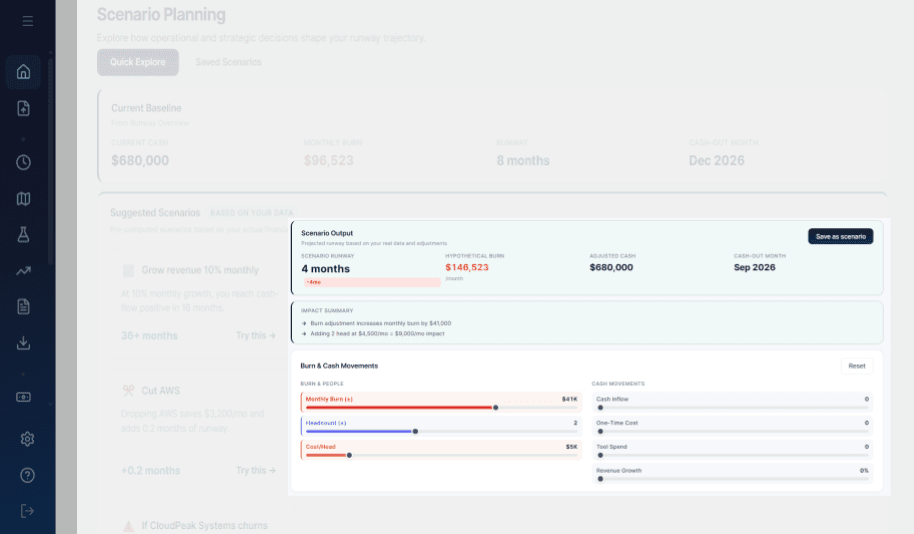
Inside RunwayCal · Scenarios
The visible product supports changing assumptions and comparing runway, burn, cash, and cash-out timing against a baseline.
Product proof
Keep the production plan connected to the complete financial position.
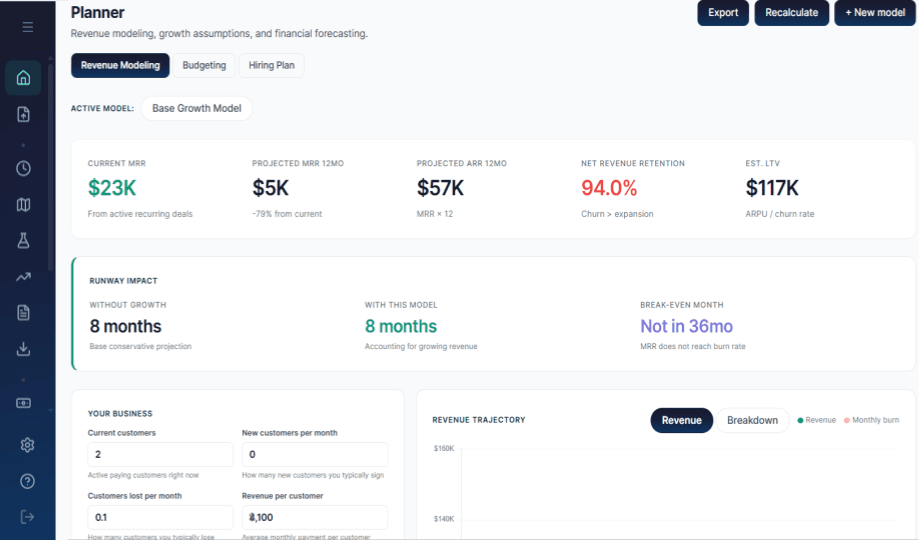
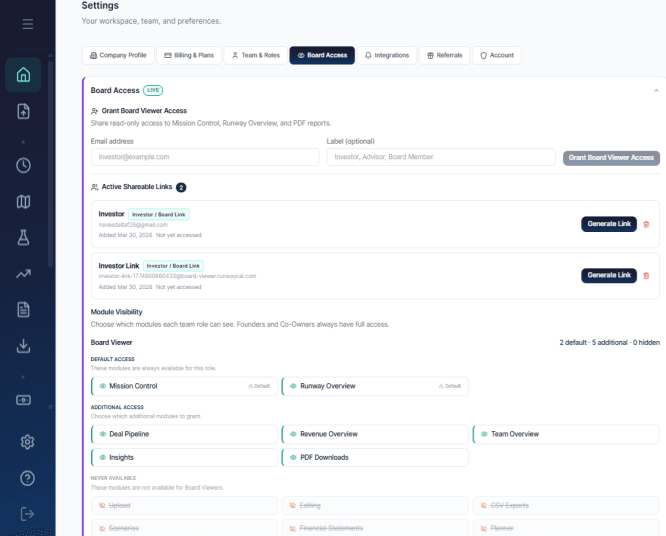
Mission Control holds the current financial view. Planner carries the production assumptions. Board Access keeps a selected read-only view available without making a plant-specific reporting claim.
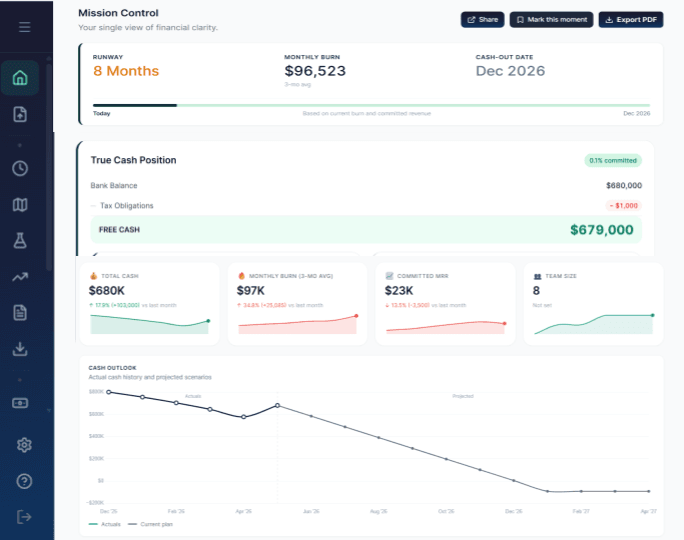
Primary product view · Mission Control
Start with the complete financial position.
The visible product brings runway, monthly burn, cash-out date, True Cash Position, and financial summary context together. It is general product evidence, not a plant dashboard.
Planning evidence · Planner
Keep the capacity decision inside the financial plan.
The Planner surface keeps revenue, budget, hiring, and runway-impact assumptions visible. It does not schedule production or allocate factory resources.
Supporting reporting evidence · Board Access
Share a selected read-only view.
The visible settings surface supports read-only viewer access, active links, and module visibility controls. It does not claim plant-specific reporting.
Reporting & metrics
Use each number to ask a better production question.
Give owners, finance leads, and operations finance the context behind Orders, workforce, commitments, and cash.
Explore reporting- Revenue per Employee
- Decision question: Is deliverable revenue keeping pace with the current workforce?
- Visible in product
- Order Pipeline
- Decision question: How much demand is represented by current Orders?
- Product-evidenced concept
- Committed Revenue
- Decision question: How much Order Value is committed but still waiting to become cash?
- Product-evidenced concept
- Production capacity
- Decision question: Can the current production assumption support the Order plan?
- Planning concept
- Labor capacity
- Decision question: Is workforce-supported output the active bottleneck?
- Planning concept
- True Cash Runway
- Decision question: How long can the business operate after known commitments?
- Website language
Some measures are visible in the product today. Others are website-supported or conceptual planning lenses, not automatic calculations.
Keep planning
Carry the production question into the plan.
Move from capacity and timing into the planning view that answers the next financial question.
Plan what the business can deliver without losing sight of cash.
Connect orders, production constraints, workforce, materials, and commitments before the next move becomes fixed.