
Reconcile cash in Treasury
The Reconciliation tab in Treasury is a view into RunwayCal's one reconciliation system. Review bank and connected-source activity and resolve each item — without changing your cash.
One reconciliation, two places to open it
Reconciliation helps you connect statement transactions to financial activity already recorded in RunwayCal. You can open the same reconciliation items from Treasury or from the main Reconciliation area — it's the same system and the same items.
An item has the same state wherever you see it: Needs review, Ready to resolve, Blocked or Resolved. Classifying, splitting and resolved history work the same way in both places.
Reviewing and resolving items never changes your cash on its own. Importing a statement doesn't change your balance, and resolving an item against a payment you've already recorded doesn't create a second cash movement.
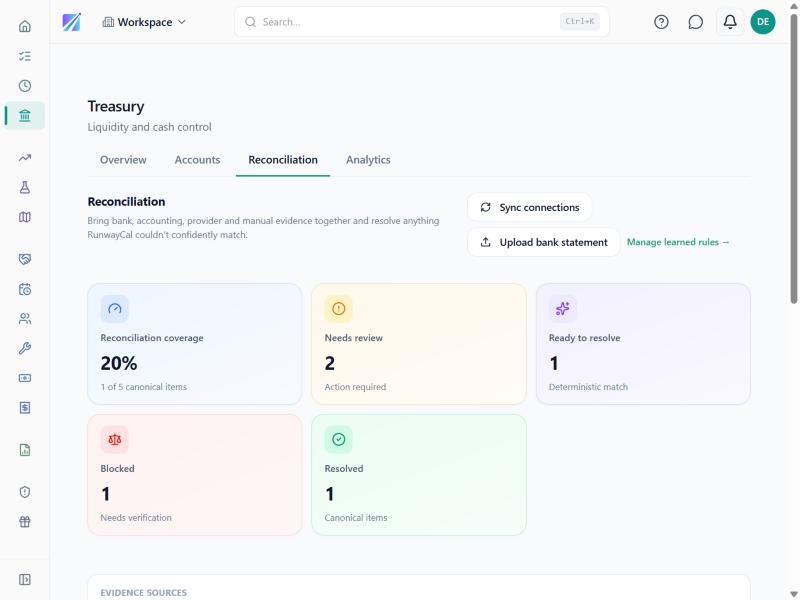
What each status means
| Status | What it means | What to do |
|---|---|---|
| Needs review | An item RunwayCal couldn't match on its own. | Classify it to the right record. |
| Ready to resolve | RunwayCal has enough information to present the item for you to review and resolve. | Review and resolve it. |
| Blocked | Something needs a closer look before resolving. | Open it and review the detail. |
| Resolved | Already matched to the right record. | Nothing — view it any time. |
The steps live in the Reconciliation docs
Importing statements, classifying, splitting and handling duplicates are covered in detail in the Reconciliation documentation. Treasury gives you another place to work with the same reconciliation items.
Related
See your cash position clearly in RunwayCal.
Review and resolve statement activity from Treasury.