Board meeting preparation

Show the board where the business stands, what changed, and what needs a decision.

Prepare the current numbers, the movement behind them, and the decision that needs the room. Generate supported reporting on demand, review it, and choose what to export or share through read-only Board Access.

Start
Where the business stands
Explain
What changed and why
Finish
The decision or ask
Conceptual board narrative
01CurrentWhere we stand
02ChangeWhat moved
03WhyWhat explains it
04DecisionWhat needs a decision

A meeting sequence, not an automatically written board narrative.

What does the board need to understand and decide?

Board meeting preparation turns reviewed financial information into a clear sequence: where the business stands, what moved, why it moved, what deserves attention, and what decision or help is needed. Reporting assembles supported output. The founder or finance team still supplies the explanation and controls sharing.

01Where does the business stand now?
Open with the reviewed cash, runway, burn, revenue, plan, and period context that matters to this meeting.
02What changed, and why?
Place movement beside the assumption, event, or variance that explains it instead of leaving the board to infer the story.
03What needs attention or a decision?
End with the question, trade-off, or help the leadership team wants the board to discuss.

Keep the numbers and choices separate as you work through the decision.

01

Start with the current position, not a pile of metrics.

Choose the period and the few numbers that define where the business stands. Mission Control and supported reporting outputs can provide the starting evidence, but the meeting still needs a deliberate point of view.

02

Explain the movement behind the number.

A reported result says what happened. A useful board discussion also says what changed from the prior period or plan and which assumptions, receipts, costs, or timing differences explain the movement.

03

Put the reason beside the variance.

Budget vs Actual and period comparisons can identify a gap. RunwayCal does not invent the cause. The team reviews the underlying figures and adds the explanation the board needs to understand it.

04

Finish with the decision or ask.

State the hiring, spend, funding, timing, or planning question that needs discussion. If the board asks about an alternative, open a saved scenario without presenting hypothetical values as the current plan.

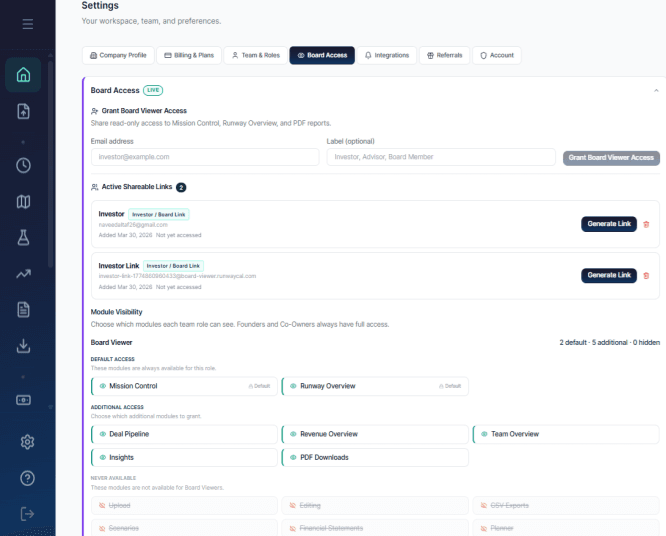
Choose what the board can see before you share the link.

Board Access provides a read-only view, and the company chooses which modules to include. The screenshot shows those controls. It does not imply that RunwayCal writes or sends the board story for you.

RunwayCal Board Access settings with active links and visible read-only module controls
RunwayCal Board Access settings: sharing is explicit, bounded, and revocable.

Related numbers can still answer different questions.

Generate
Create a supported board deck or reporting output on demand.
Review
Check the figures, period, assumptions, and explanation before sharing.
Share
Export or grant read-only Board Access through an explicit action.

Board preparation

Prepare the numbers. Bring the decision into the room.

Review the output, add the explanation, and choose what the board can see.