
Read your statements
How to read your P&L
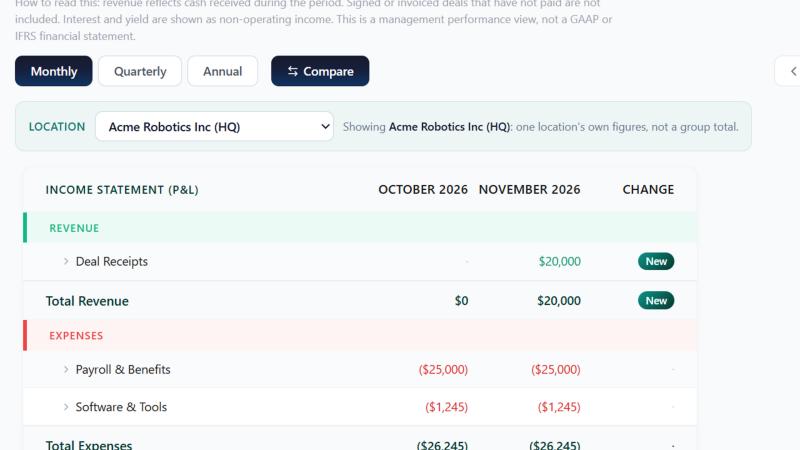
Read your Profit & Loss in RunwayCal: revenue, operating expenses, net income and margin, plus non-operating lines like interest and debt. Expand any line to see what makes it up.
The P&L, top to bottom
The P&L flows from revenue down to net income, then shows non-operating items separately.
- Revenue — cash recorded as received from deals in the period; expand it to see revenue by deal.
- Expenses — Payroll & Benefits (by department), Software & Tools, and your operating commitment categories (insurance, rent, and so on).
- Total Expenses and Net Income (Loss) — revenue minus operating expenses, with a net-margin badge.
- Other Income — interest and yield, shown separately from revenue.
- Other / Non-Operating Expense and Profit After Non-Operating — where debt interest appears, if you have debt.
Gross margin appears when it applies
If your business has a cost-of-revenue category, the P&L shows Gross Profit and Gross Margin. If it doesn't apply to your business, those lines are simply not shown — that's intentional, not a missing value.
Reading the numbers
- A loss shows in parentheses, e.g. ($6,245); the net-margin badge turns negative too.
- Interest is in Other Income, not Revenue — so Net Income reflects your operating result.
- A blank (·) means no value is established for that line, which is different from a known $0 — see reading a missing value.
Related
RevenueIn RunwayCal, Revenue is the cash recorded as received from your deals during the selected period. A signed or invoiced deal that hasn't been paid is not counted — this is a cash-based view, not invoiced or accrual revenue.ExpensesRunwayCal's P&L expenses cover payroll (by department), software & tools, and your operating commitments. Some are smoothed or scheduled to the period, so a line isn't always the exact cash paid that month.Other IncomeInterest and yield appear as Other Income in RunwayCal, separate from operating Revenue. It's a projected estimate based on your treasury balances and rates — not operating revenue and not a realized cash credit.Missing vs zeroIn RunwayCal's statements, $0 is a known zero and a blank (·) means no value is established for that state. An unavailable or withheld figure is never treated as zero — understanding the difference keeps your reading accurate.
See how your business performed and where cash went with RunwayCal.
Understand exactly what counts as Revenue.